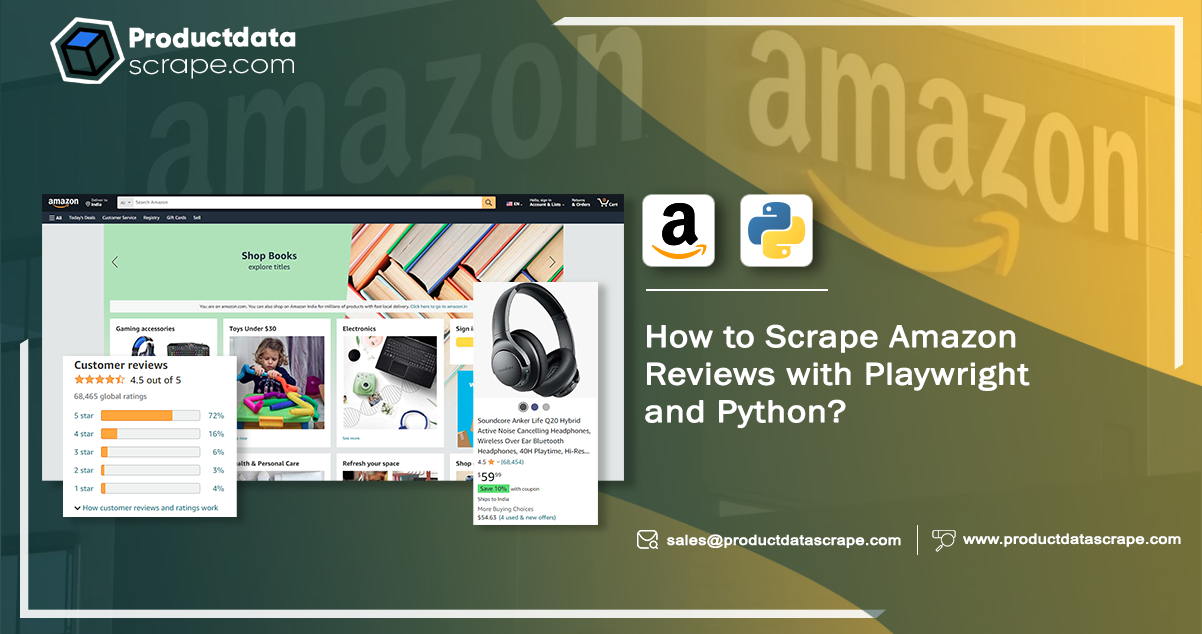
Understanding customer sentiment through product reviews is vital for Amazon sellers and researchers. However, manually sifting through numerous reviews is impractical. Luckily, web scraping Amazon data provides a solution.
This tutorial demonstrates using Playwright and Python to scrape Amazon reviews efficiently. We'll guide you through setting up your environment, installing necessary software and libraries, including Playwright, and using its automation capabilities to extract reviews from Amazon product pages.
Before we delve into Amazon review scraping, let's explore Playwright, a powerful web automation library that simplifies the web scraping process.
Why Engage in Amazon Product Review Scraping?
Scraping Amazon reviews yields several advantages:
- Rating Analysis: Monitor prevailing rating scores to gauge the quality of reviewed products.
- Identify Valuable Feedback: Identify the most helpful reviews and leverage their content for product comparisons and recommendations.
- Enhance Marketing: Refine advertising and messaging strategies by gaining insights from customer feedback.
- Evaluate Reach: Sort reviews by date or location to assess the product's reach and impact.
- Focus on Verified Reviews: Filter and analyze verified-only reviews for higher credibility.
- Image Comparison: Collect user-generated product images for direct comparisons with advertised images, aiding in transparency and authenticity assessment
Amazon Review Scraping: Simplifying with Playwright and Python
Transitioning to Playwright is a breeze for those well-versed in web scraping tools like BeautifulSoup and Selenium.
Playwright, a Python library, stands out as a specialized solution for browser automation. Its standout features include native compatibility with various browsers (Chromium, Firefox, WebKit) and a unified, potent API for automating web interactions. Furthermore, it excels in headless mode and addresses typical web scraping challenges, such as handling dynamic websites. This guide will briefly describe how to scrape Amazon reviews with Playwright and Python.
The Utilization of async and await in Playwright for Web Scraping
The Playwright leverages async and awaits to enhance the efficiency of e-commerce web scraping through asynchronous programming.
Asynchronous programming enables concurrent execution of tasks, significantly speeding up the scraping process compared to synchronous programming, where tasks execute one after the other. In synchronous programming, if one task is time-consuming, it can block the entire program's progress.
However, asynchronous programming can introduce challenges related to task dependencies. Some operations may require prior tasks to avoid errors. For example, when registering for a service, you must enter user details before clicking the registration button. It is where async is invaluable. By using Amazon data scraping services, you ensure they are complete before proceeding with the program. Async is commonly used before functions, enabling the creation of non-blocking code that runs efficiently and without unnecessary delays.
Playwright Integration in Jupyter Notebook"
When working in Jupyter Notebook, understanding Playwright's async API is crucial. While Playwright isn't for Jupyter, it utilizes it due to its compatibility with async programming.
Installation
If Playwright isn't available, you can easily add it by executing the following code in your terminal:
pip install playwright
Getting Started with Playwright for Web Scraping
Now that Playwright is installed and you know its capabilities, let's begin our journey into Amazon data scraping. We'll explore the code and how Playwright and Python work together to extract reviews from Amazon product pages.
How to Scrape with Playwright?
Before we jump into the code, let's take a moment to outline the data we aim to extract from Amazon product reviews. We'll be focusing on retrieving five critical pieces of information for each review:
- Review Title: A concise headline summarizing the customer's product review.
- Review Body: The main content of the review contains detailed feedback.
- Product Color: The color variant of the reviewed product, if applicable.
- Review Date: The date when the customer posted the review.
- Rating: Review the numerical score (1 to 5 stars) given to the product.
These data points offer valuable insights into customer opinions and can aid in making informed purchasing decisions. Now, armed with this information, ecommerce data scraping service uses Playwright and Python to extract these details from the Amazon website.
Essential Libraries for Web Scraping with Playwright
To effectively perform web scraping using Playwright, we rely on specific libraries that streamline the scraping workflow. Let's examine these crucial libraries in more detail.
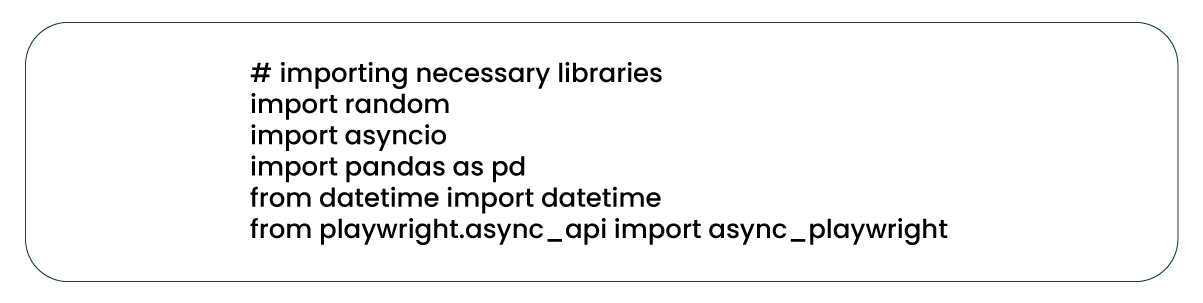
Essential Libraries for Web Scraping
Several essential libraries are best for the web scraping process:
Random: A built-in Python library used to generate pseudo-random numbers. It introduces randomness by adding a variable delay between retries when making web requests.
Asyncio: A standard Python library for writing asynchronous code and to extract amazon reviews data. It plays a pivotal role in managing coroutines during scraping. Coroutines are functions that pause and resume, allowing concurrent execution of tasks.
Pandas: A widely-used third-party library for data manipulation and analysis in Python. Pandas create a structured DataFrame for storing the extracted review data.
DateTime: A built-in Python library for working with dates and times. In this context, it helps parse and format review dates.
async_playwright: A Python library that provides a high-level API for controlling web browsers and automating web scraping tasks, making it a fundamental tool in our web scraping journey.
Creating Functions for Streamlined Web Scraping
It's considered a best practice to organize code into functions to enhance modularity, reusability, and maintainability. Breaking down the web scraping process using Amazon data scraper into distinct functions enables efficient management of tasks such as web page requests, data extraction, and result storage.
We'll define functions dedicated to extracting review information in the upcoming sections. These functions will leverage Playwright's 'evaluate' method to execute JavaScript code snippets, pinpoint relevant review elements using the 'data-hook' attribute, and retrieve their inner text. If an element is unavailable, the function will return "not available." Additionally, these functions will handle any necessary data cleaning or formatting.
Creating a Function for Review Title Extraction
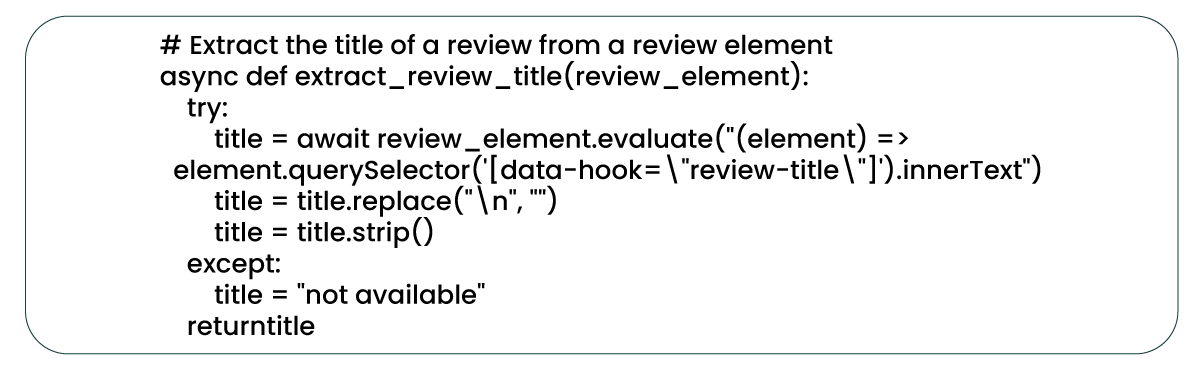
The 'extract_review_title' function captures the title of a review from a review element and presents it as a string. Subsequently, it eliminates newline characters and leading whitespace to yield a cleaned title.
Once the review title extraction process is available using the 'extract_review_title' function, similar functions can extract additional information from the review element. These include functions for retrieving the review body, review date, rating, and the color of the reviewed product.
Creating a Function for Review Body Extraction
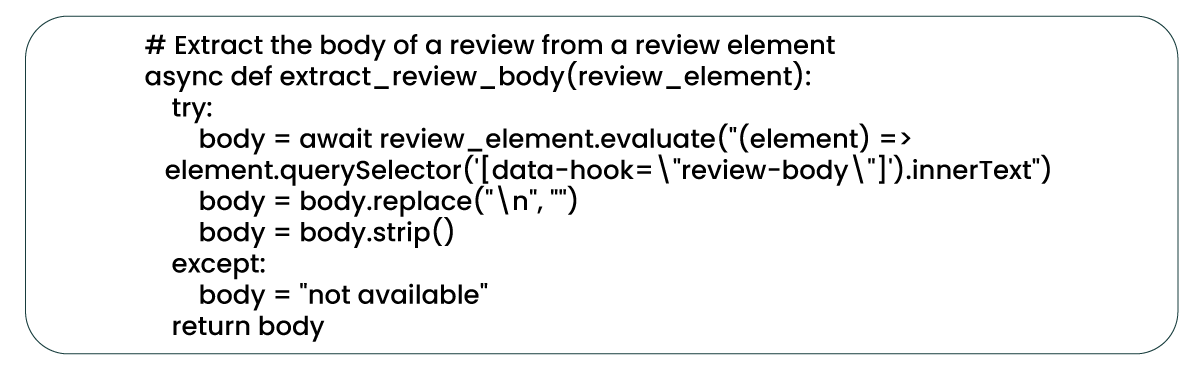
As previously explained, the 'extract_review_body' function retrieves a review's content from a review element, mirroring the process of extracting the review title.
Developing a Function for Product Color Extraction
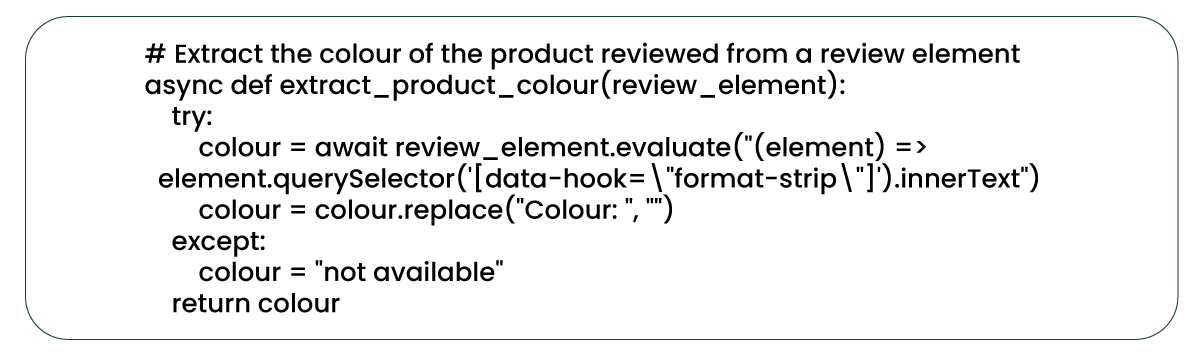
The 'extract_product_color' function extracts and provides the product's color under review. In cases where the color information is unavailable, the function returns "not available." The function employs the 'replace' method to refine the extracted text, eliminating the "Colour: " prefix and retaining only the actual color name.
Creating a Function for Review Date Extraction
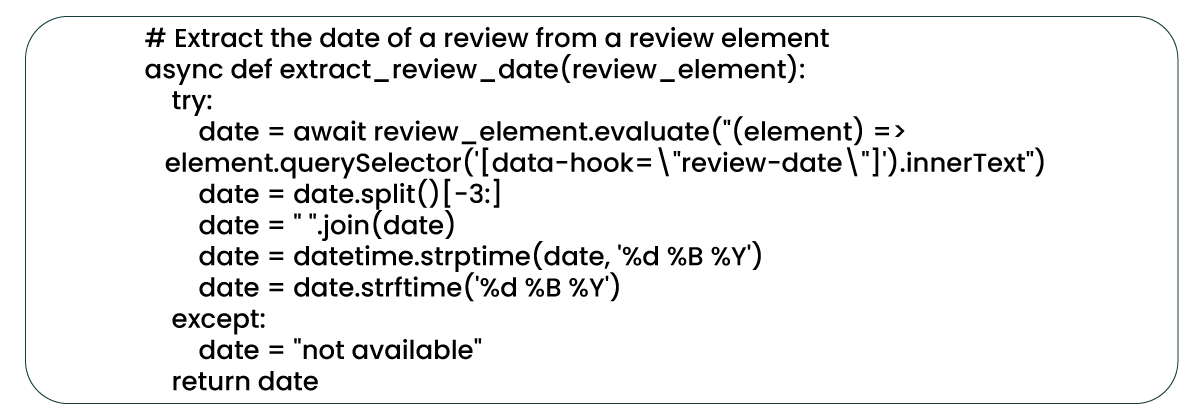
The 'extract_review_date' function extracts the review date from a review element, representing when the customer composed the review. Subsequently, it performs data cleaning tasks by converting the extracted date into a datetime object and then reformatting it to a specified date string format.
Creating a Function for Review Date Extraction and Formatting
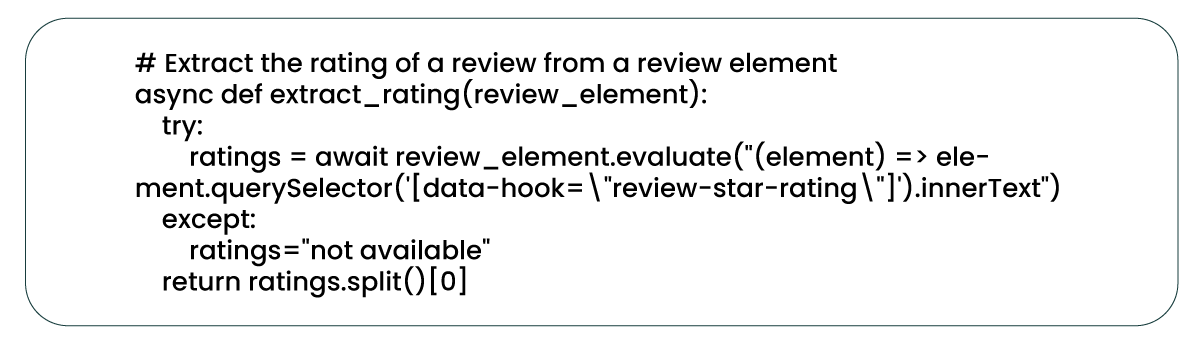
The 'extract_rating' function extracts the review rating from a review element and returns it as a numerical value (e.g., "5" for a 5-star rating). Since the rating element's text may contain additional information beyond the numerical value, the function utilizes the 'split' method to isolate and extract only the numerical rating value (e.g., "4.5") from the element's inner text.
Function for Executing Web Requests with Retry Handling
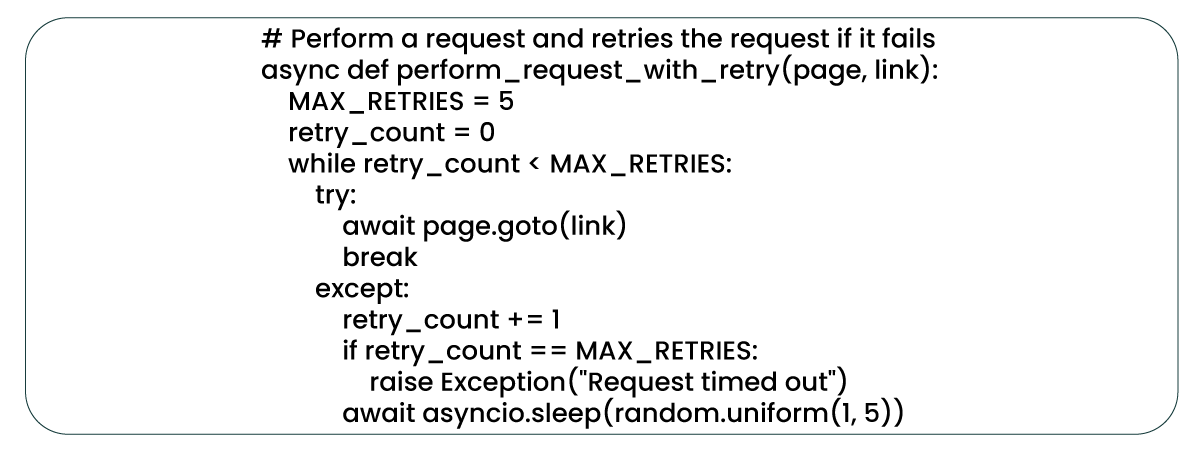
The 'perform_request_with_retry' function is asynchronous and employs Playwright's 'page.goto()' method to initiate a web request. In case of a request failure, the function orchestrates up to five retry attempts, introducing a random delay between 1 and 5 seconds. If all retry attempts are unsuccessful, the function raises an exception, signifying a request timeout. The 'asyncio.sleep()' function regulates the delay between retries, and 'random.uniform()' generates the random delay within the specified range.
Creating a Function to Extract Reviews from Multiple Page
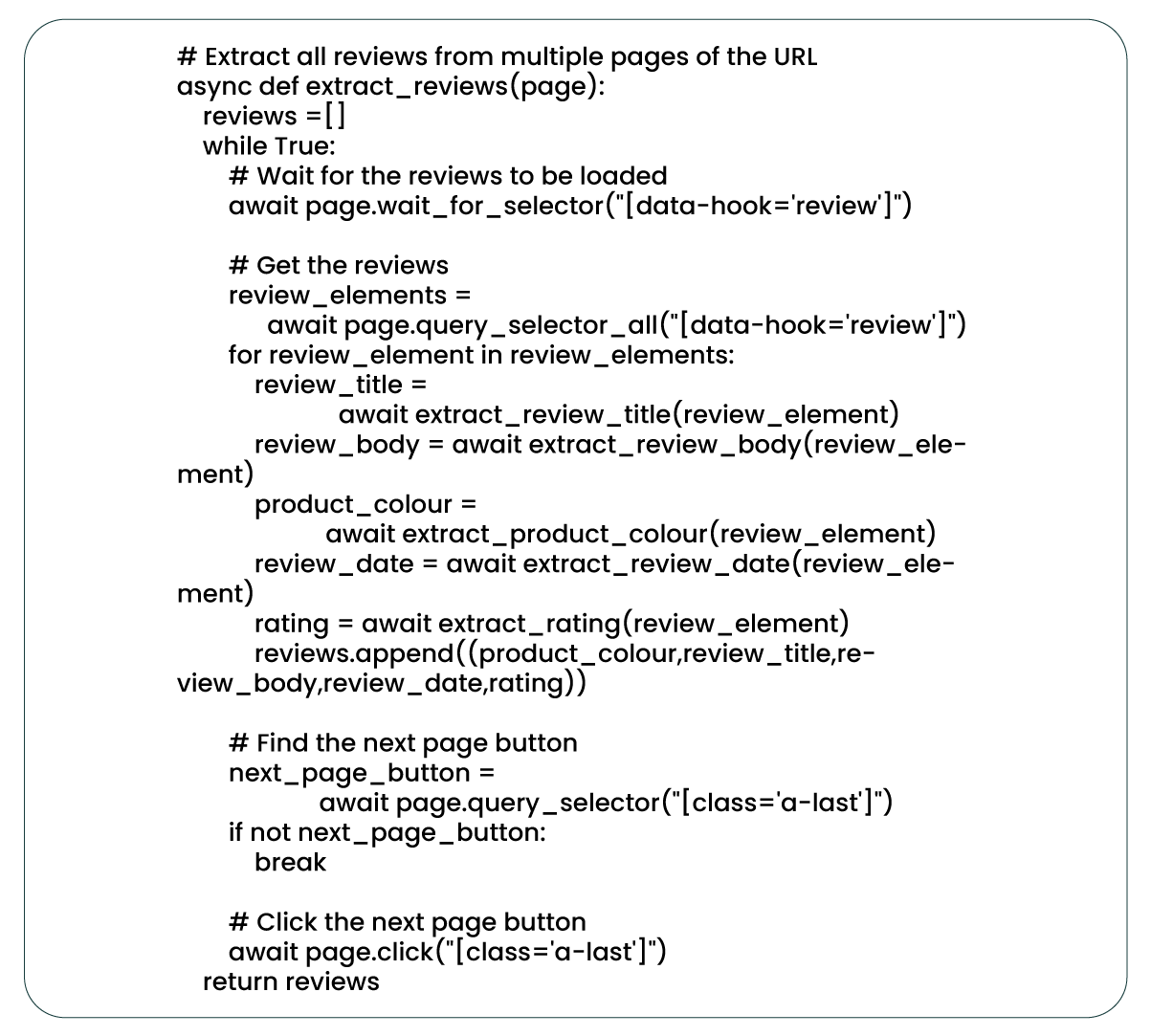
This function collects reviews from multiple pages of a given URL. It begins by waiting for the reviews to load, then proceeds to extract critical details such as review title, review body, product color, review date, and rating from each review element on the page. These extractions are available by invoking previously defined functions: 'extract_review_title,' 'extract_review_body,' 'extract_product_color,' 'extract_review_date,' and 'extract_rating.' Add the extracted data to a reviews list.
The function also searches for the next page button and triggers a click action to navigate to subsequent review pages. This process continues until no more reviews remain. Ultimately, the function returns a list of tuples containing the extracted data for review. This function seamlessly integrates previously defined functions to extract comprehensive information from Amazon product reviews spanning multiple pages.
Function for Storing Extracted Reviews in a CSV File

The 'save_reviews_to_csv' function accepts a review lists as input and exports them to a CSV file as 'amazon_product reviews15.csv.' The file includes columns for 'product_colour,' 'review_title,' 'review_body,' 'review_date,' and 'rating,' and executes the operation using the Pandas library.
Asynchronous Web Scraping of Amazon Product Reviews with Playwright
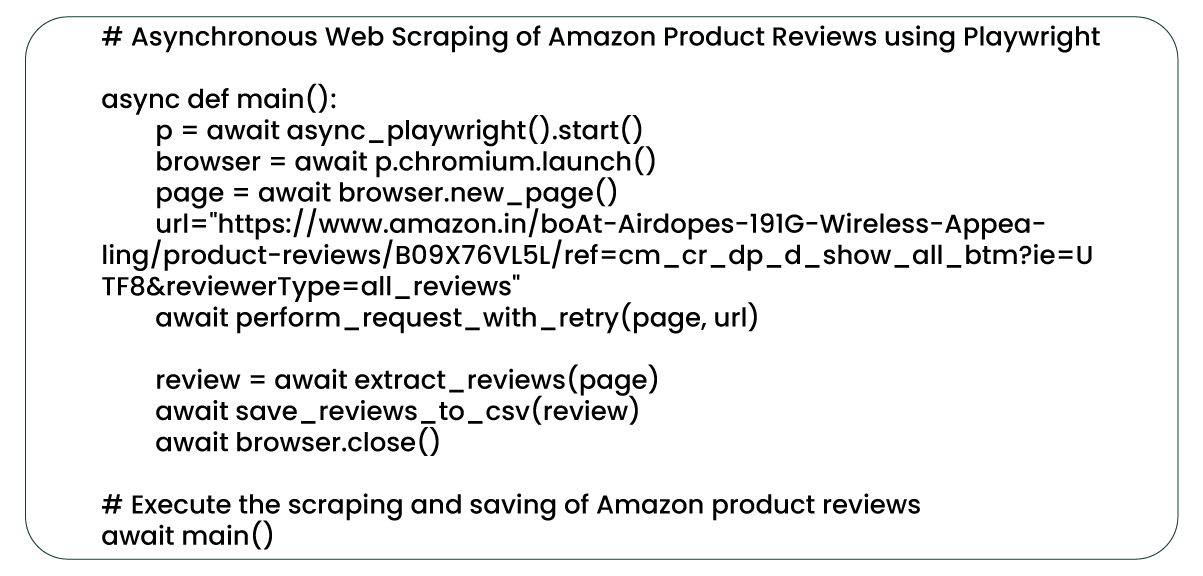
The 'main' function is the central component of this web scraping procedure, coordinating the entire process.
Within this function, an instance of the Playwright Library is available. Launch a headless Chromium browser and create a new page to navigate to the product reviews URL. Here, the term 'headless browser' signifies that the browser operates without a graphical user interface, enhancing the efficiency and speed of the scraping process as it eliminates the need for page rendering or display. Chromium, known for its speed and efficient memory usage, is a preferred choice for web scraping.
The 'perform_request_with_retry' function ensures the request's success. It introduces a mechanism for the script to retry the request should any network errors occur. Following a successful request, the 'extract_reviews' function gathers all product reviews, and the 'save_reviews_to_csv' function stores these reviews in a CSV file.
Ultimately, the script closes the browser, thus finalizing the asynchronous web scraping process. The 'main' function is executed at the script's end to initiate the web scraping process and extract reviews from the Amazon product review page.
Conclusion: Playwright has demonstrated its speed and efficiency as a formidable tool for web scraping Amazon product reviews, positioning itself as a credible alternative to well-established scraping tools such as BeautifulSoup and Selenium. Its asynchronous, headless functionality simplifies concurrently handling multiple requests, resulting in swift and efficient data extraction.
For those intrigued by web scraping and data extraction, Playwright offers an exceptional platform for learning and experimentation. With a wealth of APIs, resilience, and outstanding developer experience, it presents a compelling case for exploration. Don't hesitate to delve into the world of possibilities that Playwright offers.
Product Data Scrape is committed to upholding the utmost standards of ethical
conduct across our Competitor Price Monitoring Services and Mobile App Data Scraping operations.
With a global presence across multiple offices, we meet our customers' diverse needs with
excellence and integrity.



 Singapore
 EMAIL
EMAIL
 PHONE
PHONE












.webp)